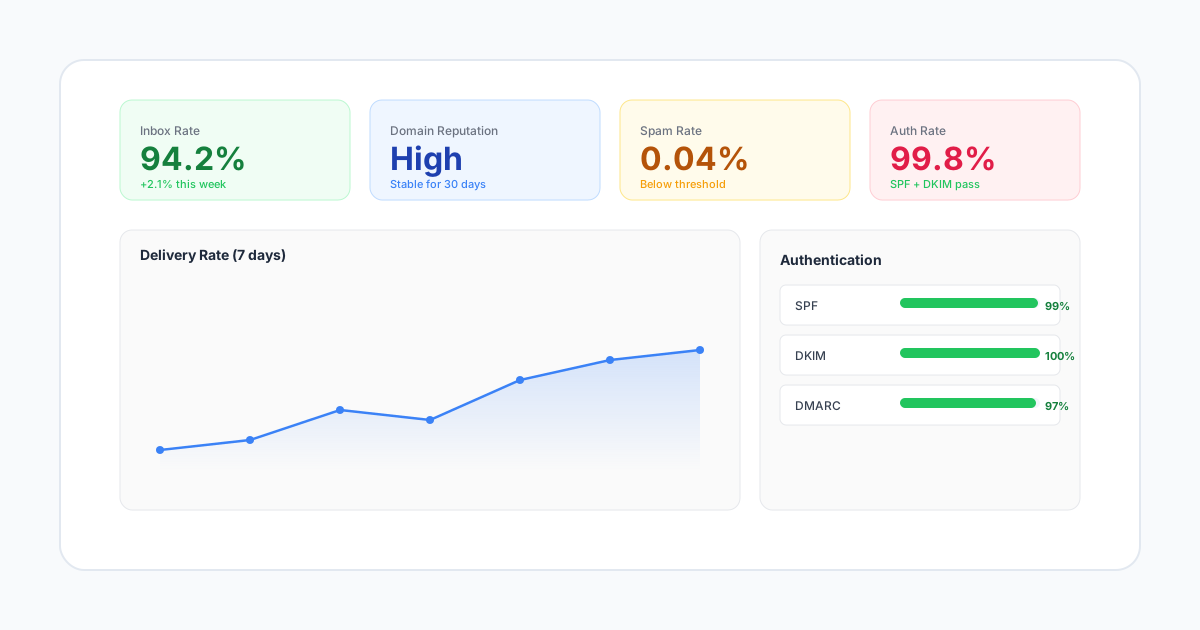
Google Postmaster Tools provides invaluable insights into how Gmail views your sending reputation. Understanding these metrics is essential for diagnosing deliverability issues and maintaining inbox placement. This guide walks you through setup, metric interpretation, and real-world troubleshooting scenarios.
What is Google Postmaster Tools?
Google Postmaster Tools (GPT) is a free service that shows how Gmail evaluates your domain and IP reputation. It's one of the few windows into the black box of email deliverability at Gmail, the world's largest email provider with over 1.8 billion users.
To use GPT, you need to verify domain ownership and send sufficient volume to Gmail addresses (typically 100+ daily messages for meaningful data). Without it, you're flying blind on how Gmail treats your email - and Gmail accounts for 30-40% of most B2C email lists.
Step-by-Step Setup Guide
Step 1: Access Google Postmaster Tools
Go to postmaster.google.com and sign in with a Google account. This does not need to be a Gmail address - any Google Workspace account works. Use a shared team account rather than a personal one so multiple team members can access the data.
Step 2: Add and Verify Your Domain
Click the red "+" button and enter your sending domain (e.g., mail.yourdomain.com or yourdomain.com). Google will ask you to verify ownership by adding a TXT record to your DNS:
- Copy the verification TXT record Google provides
- Add it to your domain's DNS zone file (usually through your registrar or DNS provider)
- Wait for DNS propagation (can take 5 minutes to 48 hours, typically under 1 hour)
- Click "Verify" in Postmaster Tools
Tip: Add both your root domain and any subdomains you send from (e.g., notifications.yourdomain.com). Each sending subdomain should be verified separately for the most granular data.
Step 3: Wait for Data
GPT does not show historical data from before verification. Data starts appearing 24-48 hours after verification, and only if you're sending sufficient volume to Gmail addresses. If you send fewer than 100 emails per day to Gmail, you may not see any data at all.
Step 4: Set Up Regular Monitoring
Check your GPT dashboard at least twice per week. Set a calendar reminder. The most common mistake senders make is only checking GPT after a deliverability crisis - by then, the damage has been building for days or weeks.
Key Metrics Explained
Domain Reputation
This is the overall health score for your domain, ranging from Bad to High:
- High: Excellent standing, emails should reach inbox consistently
- Medium: Generally good, but some filtering may occur during high-volume sends
- Low: Significant deliverability issues likely, expect increased spam folder placement
- Bad: Severe problems, most email going to spam or being rejected outright
Domain reputation is influenced by user engagement (opens, clicks, replies), complaint rates, spam trap hits, and authentication status. It takes weeks of consistent positive signals to move from Low to Medium, and months to reach High. But it can drop from High to Low in just a few days after a bad campaign.
IP Reputation
Similar to domain reputation but specific to your sending IP addresses. Uses the same scale (Bad to High).
If your domain reputation is high but IP reputation is low, you may be sharing IPs with problematic senders or have issues with a specific sending server. This is a common signal that you need to move to dedicated IPs.
Conversely, if your IP reputation is high but domain reputation is low, the problem is with your content or sending practices - not your infrastructure.
Spam Rate
The percentage of your emails marked as spam by Gmail users. This is different from spam folder placement - it measures explicit user complaints (clicking "Report spam").
- Healthy: Below 0.1% (aim for under 0.05%)
- Warning: 0.1% - 0.3% (take immediate action to identify cause)
- Critical: Above 0.3% (reputation damage occurring, pause and investigate)
Even small increases in spam rate can significantly impact deliverability. Google's February 2024 sender guidelines explicitly state that senders must keep spam rates below 0.3% - and ideally below 0.1%. Monitor this metric daily.
Authentication
Shows the percentage of your email passing SPF, DKIM, and DMARC checks:
- SPF: Verifies sending server is authorized by your domain's DNS records
- DKIM: Confirms email integrity and domain ownership through cryptographic signatures
- DMARC: Policy enforcement and alignment between SPF/DKIM and the From domain
Target 100% pass rates for all three. Any failures indicate configuration issues that need immediate attention. A common cause of partial failures is forgetting to authorize a new sending service (like a CRM or marketing tool) in your SPF record.
Encryption
Percentage of email sent over TLS (encrypted connection). Gmail strongly prefers TLS and may flag unencrypted email as less trustworthy. Since October 2023, Gmail shows a warning icon on unencrypted emails.
Modern email infrastructure should show 100% TLS. Lower numbers indicate outdated sending systems or SMTP relays that don't support STARTTLS. If you see anything below 100%, check your MTA configuration immediately.
Delivery Errors
Shows temporary and permanent delivery failures broken down by error type:
- Rate limit exceeded: You're sending too fast for your reputation level - throttle your sending speed
- Suspected spam: Content or reputation issues triggering Gmail's filters
- Bad or unsupported attachment: File type issues (e.g., .exe attachments are always blocked)
- DMARC policy: Authentication failures causing rejects based on your DMARC policy
- Low reputation: Your IP or domain reputation is too low for Gmail to accept the volume
Real-World Troubleshooting Scenarios
Scenario 1: Sudden Spam Rate Spike After a Campaign
You send a promotional campaign on Monday and see your spam rate jump from 0.05% to 0.4% on Tuesday in GPT.
Diagnosis: Check what was different about that campaign. Common causes: sending to a stale segment that hasn't been emailed in months, misleading subject lines, or content that doesn't match subscriber expectations.
Action: Immediately pause marketing sends to the affected segment. Send only to your most engaged subscribers for the next 5-7 days to rebuild positive engagement signals. Review and clean the segment before re-sending.
Scenario 2: Domain Reputation Drops from High to Medium
Over a two-week period, your domain reputation gradually declines from High to Medium. No single campaign stands out.
Diagnosis: This usually indicates a slow build-up of negative signals. Check for: increasing bounce rates (list decay), declining engagement rates, or a new sending source (like a product notification system) that wasn't properly configured.
Action: Audit all sending sources for the domain. Verify authentication for each one. Tighten your engagement-based suppression rules - if someone hasn't opened in 90 days, stop sending. Focus on high-engagement sends for 2-3 weeks.
Scenario 3: IP Reputation is Low but Domain Reputation is High
Your domain shows High reputation, but one or more of your sending IPs show Low or Bad reputation.
Diagnosis: If you're on shared IPs, another sender is likely damaging the pool's reputation. If you're on dedicated IPs, a specific IP may have been listed on a blocklist or may not have been properly warmed up.
Action: For shared IPs - switch to dedicated IPs immediately. For dedicated IPs - check major blocklists (Spamhaus, Barracuda, SORBS), review the specific IP's sending patterns, and consider rotating to a fresh IP with proper warmup.
Scenario 4: Authentication Rate Drops Below 100%
Your SPF pass rate drops from 100% to 92%. DKIM remains at 100%.
Diagnosis: A new service or server is sending email using your domain but isn't listed in your SPF record. Or a third-party tool was updated and changed its sending IPs.
Action: Audit your SPF record against all known sending sources. Check if any third-party services recently changed their IP ranges. Add missing includes or IPs. If you can't identify the source, use DMARC aggregate reports (RUA) to pinpoint which IPs are failing SPF.
Using GPT Data Effectively
Establish Baselines
Before making changes, understand your normal metrics. Track daily readings for at least two weeks to establish what "normal" looks like for your sending patterns. Document your baseline spam rate, authentication rates, and reputation levels. Without baselines, you can't tell if a metric change is a real problem or normal variation.
Correlate with Campaigns
Map reputation changes to specific campaigns. Did a particular send cause a spam rate spike? Keep a log of every campaign with date, volume, segment, and content type. When GPT metrics change, you can trace back to the exact campaign responsible.
Watch for Trends
Single-day fluctuations are normal. Look for sustained trends over 3-5 days before taking action. Gradual reputation decline is more concerning than day-to-day variation. A spam rate of 0.2% for one day is worth watching. A spam rate of 0.2% for five consecutive days requires immediate action.
Act on Authentication Failures
Any authentication failures should be investigated immediately. Check DNS records, verify DKIM keys are correctly deployed, and ensure all legitimate sending sources are properly configured. Authentication failures are the easiest problems to fix and the most damaging to ignore.
Limitations of GPT
While valuable, GPT has important limitations you should be aware of:
- Gmail only: Shows data only for Gmail recipients, not Outlook, Yahoo, or other providers
- Volume threshold: Requires minimum volume (roughly 100+ daily emails to Gmail) for data to appear
- Data delay: Data is delayed by 24-48 hours, making it unsuitable for real-time monitoring
- No inbox placement: Doesn't show inbox vs. spam placement directly - reputation is a proxy
- Aggregated data: Can obscure specific issues when you send from multiple IPs or subdomains
- No API access: No official API for automated data collection (though third-party scrapers exist)
To get a complete deliverability picture, you need to supplement GPT data with seed-based inbox testing, engagement analytics from your ESP, and similar tools for Microsoft (SNDS) and Yahoo.
Beyond GPT: Other Postmaster Tools
Microsoft SNDS (Smart Network Data Services)
Microsoft's equivalent for Outlook, Hotmail, and Live.com. Shows IP reputation, spam trap hits, and complaint data for Microsoft recipients. Set up at sendersupport.olc.protection.outlook.com/snds.
Yahoo Complaint Feedback Loop
Yahoo offers a feedback loop (FBL) that notifies you when Yahoo Mail users mark your email as spam. Register at feedbackloop.yahoo.net. Unlike GPT which shows aggregate data, Yahoo's FBL sends individual complaint notifications.
Combining Multiple Data Sources
The most effective deliverability monitoring combines GPT data with Microsoft SNDS, Yahoo FBL, blocklist monitoring (Spamhaus, Barracuda), and your own engagement metrics. No single tool gives the complete picture.
SMTPCloud Postmaster Integration
SMTPCloud integrates Google Postmaster data directly into your dashboard, combining it with our own deliverability metrics for a complete picture. We also provide:
- Automated alerts when reputation metrics change, with suggested actions
- Correlation analysis linking specific campaigns to reputation impact
- Similar insights for Microsoft, Yahoo, and other major providers in one view
- Expert recommendations based on your specific data patterns
- Historical trend tracking with baseline comparison
Understanding Postmaster Tools is just the beginning. True deliverability optimization requires combining this data with sending patterns, content analysis, and ISP relationships - exactly what SMTPCloud provides.
Frequently Asked Questions
How often should I check Google Postmaster Tools?
At minimum, check twice per week. If you're actively running campaigns, warming up IPs, or recovering from a reputation issue, check daily. Because data is delayed 24-48 hours, checking more than once per day rarely provides new information.
My domain reputation says "No data." What does that mean?
Either you haven't sent enough emails to Gmail addresses (need 100+ per day), you recently verified the domain and data hasn't accumulated yet, or your emails are being sent from a subdomain that isn't verified in GPT. Verify all sending subdomains and ensure sufficient Gmail volume.
Can I improve a "Bad" domain reputation?
Yes, but it takes time and discipline. Stop all non-essential sends immediately. Send only to your most engaged subscribers (opened/clicked in last 30 days). Ensure 100% authentication. Gradually increase volume over 4-6 weeks as reputation improves. Expect the recovery from Bad to High to take 6-12 weeks of consistent positive signals.
Does Google Postmaster Tools affect my deliverability?
No. GPT is a monitoring tool only - it reads your reputation data, it doesn't influence it. Verifying your domain in GPT has no impact on how Gmail processes your email. There's no reason not to set it up.
What spam rate should I target?
Below 0.1% is the industry standard for good senders. Google's own guidelines say to stay below 0.3% at all costs, and recommend staying below 0.1%. Top-performing senders maintain rates below 0.05%. If you consistently see rates above 0.1%, your list management or content strategy needs work.